
Digital content creation moves at a relentless pace. Design teams, digital marketers, and independent creators are constantly tasked with generating high-impact visual assets—from social media banners and marketing posters to product photography and conceptual diagrams. However, the traditional process of moving from a rough idea or reference sketch to a polished final image often involves a tedious back-and-forth between multiple software applications.
As generative artificial intelligence matures, the focus has shifted from simple text-to-image novelty toward precision editing, reference consistency, and multi-turn refinement. Web-based creative suites are integrating advanced image models directly into canvas editors, giving creators far greater control over layout, lighting, and targeted detail modifications.
Key Evolution in AI Image Generation Architecture
Earlier generations of text-to-image models faced distinct hurdles when applied to professional design workflows:
┌───────────────────────────────────────────────────────────────────────────┐
│ GENERATIVE AI IMAGE PIPELINE EVOLUTION │
├───────────────────────────────────────────────────────────────────────────┤
│ Legacy Models: Text Prompt ──► Random Visual Render ──► Hard-to-Edit PNG│
│ Next-Gen Systems: Text/Sketch ──► Reference-Anchored Draft ──► Targeted Edits│
└───────────────────────────────────────────────────────────────────────────┘
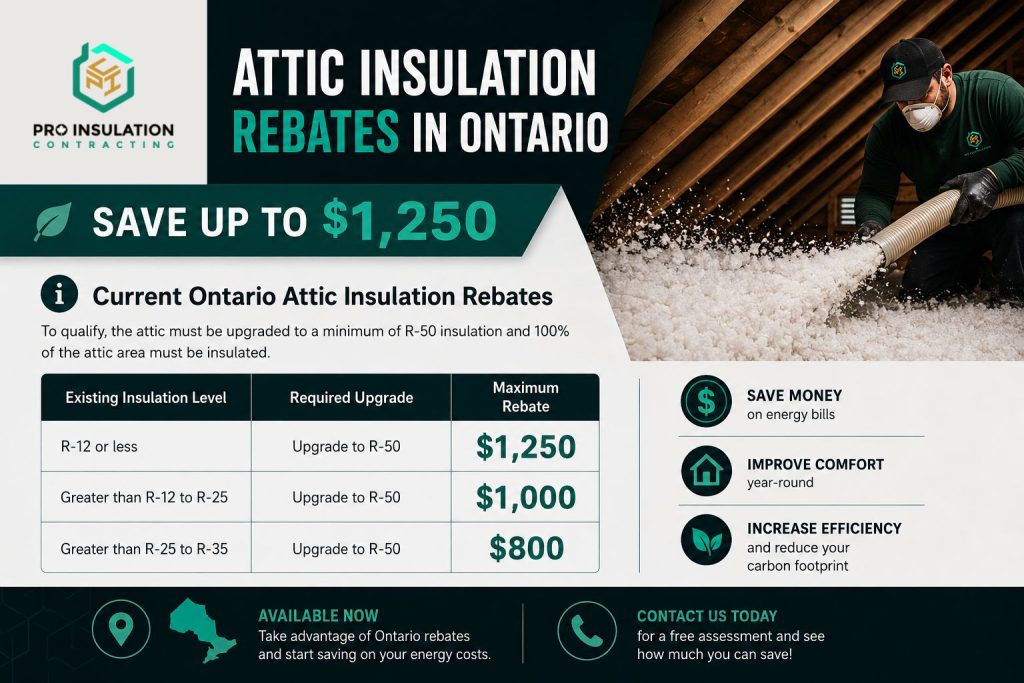
- In-Image Text Rendering: Early models frequently rendered garbled or unreadable text when generating posters, banners, or packaging. Modern image engines render sharp, legibly aligned typography directly within generated visual compositions.
- Targeted In-Context Editing: Rather than regenerating an entire image when a single detail needs changing, updated models allow localized adjustments—such as swapping a background or updating a product color—while keeping core subjects and lighting untouched.
- Multi-Turn Consistency: Maintaining character, subject, and style continuity across multiple revisions or visual panels (such as storyboards or brand series) is now built directly into model training.
1. Bridging Conceptualization and Final Production
A major advantage of modern browser-based design environments is the ability to combine generative creation with post-processing tools in a single interface.
When exploring creative concepts, designers can leverage tools like GPT Image 2.5 online within web environments to translate text prompts, reference photos, or basic sketches into detailed visual drafts. Once a draft direction is established, creators can transition seamlessly into finishing tools—such as precise cropping, background isolation, text overlay adjustments, and color grading—without leaving the browser.
2. Comparative Overview: Generative Workflows vs. Traditional Stock Editing
Evaluating how integrated AI image workflows compare to standard stock photography manipulation highlights clear operational efficiencies for digital content teams.
| Creative Parameter | Traditional Stock Sourcing & Editing | Integrated AI Generation & Refinement |
| Asset Sourcing | Hours spent searching stock libraries for exact matches. | Instant Rendering: Built directly from custom text or sketch briefs. |
| Text & Layouts | Manual overlay addition in separate photo editing software. | Integrated Text: Renders clean typography directly into compositions. |
| Subject Consistency | Difficult to find matching subjects across different settings. | Reference Anchoring: Maintains subject identity across multiple scene variations. |
| Post-Processing | Requires manual masking, clipping paths, and color matching. | Selective Editing: Updates specific details while preserving surrounding lighting and depth. |
3. Best Practices for Reference-Led Prompting
To achieve the cleanest results when generating or editing visual assets online, following a structured prompting approach yields higher predictability:
- Define the Core Composition First: Begin prompts by stating the main subject, setting, angle, and lighting environment before describing fine details.
- Utilize Rough Sketches or Layout References: When spatial placement matters (such as poster layouts or product displays), upload a basic layout reference to guide subject positioning.
- Execute Incremental Edits: Make specific, single-variable adjustment requests rather than rewriting the entire prompt when refining a generated draft.
Conclusion: A More Controlled Creative Process
As generative image technology continues to integrate deeply into everyday web tools, the focus remains firmly on usability, precision, and workflow efficiency. By pairing intuitive generative models with robust post-generation editing utilities, creators can move effortlessly from early creative ideas to final, publishing-ready visual assets.